DE
DE EN
ENA date prompt can look optional while still filtering the report. If a date is already selected, the query receives a value even when the user has not deliberately chosen to restrict the data.
Let the user choose whether to apply the date
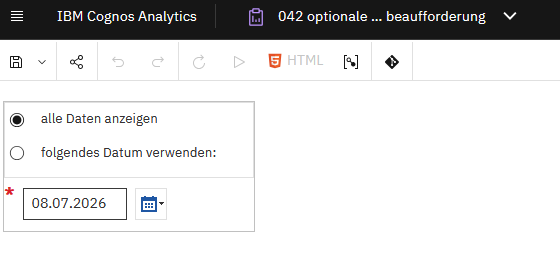
The German article demonstrates a practical way to separate the selected date from the decision to use it. Keep the calendar prompt, then add an explicit choice between Show all data and Use the selected date.
The current IBM Ideas discussion also describes the built-in checkbox of an optional date prompt: users can untick it to avoid applying the date. Check that behaviour in your target release before adding another control. The separate selection described here is useful when you want the initial report state and the wording to be unmistakable.
The approach used in the original example
- Keep the date parameter
pDatumused by the calendar prompt. - Provide two fixed choices for the filter behaviour. The original example uses a value-prompt checkbox selection.
- For Show all data, use the neutral expression
?Dummy? = ?Dummy?. The original binds the Dummy parameter through a hidden text prompt. Make sure the parameter is actually supplied; do not assume an absent or null parameter makes the expression true. - For Use the selected date, use the intended date condition, for example
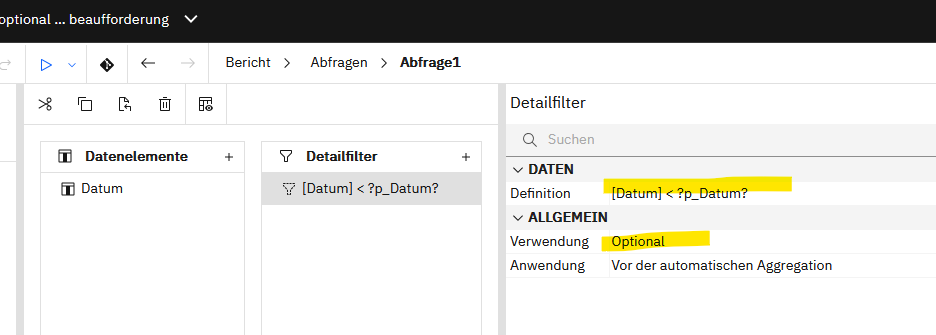
[Datum] < ?pDatum?. - Replace the fixed query filter with the prompt macro used in your report to select the appropriate expression.
The names Datum and pDatum are deliberately kept from the original report. Replace them with your own query item and parameter names. The comparison shown is strictly “before”, not “on or before”; a timestamp column may need a different boundary when the business requirement includes the whole selected day.
What to verify
- Run the report with Show all data selected and inspect the generated query.
- Select Use the selected date and confirm that the date condition is applied.
- Test both HTML and scheduled/exported runs with the expected parameter defaults.
- If your prompt supports multiple selections, prevent contradictory choices. Use one consistent filter mode.
Prompt macro tokens represent query text rather than ordinary bound values. Keep selectable expressions fixed by the report author. IBM documents the macro parameters for the 12.1.x family; that reference supports the macro mechanism, but does not independently certify this exact report in 12.1.3 or 12.2.0.
Original screenshots
The screenshots remain in German so that you can compare the translated explanation with the original report.
References
- IBM: mandatory and optional prompt macros, Cognos Analytics 12.1.x
- IBM Ideas: default checkbox behaviour of optional date prompts
English editorial revision: 5 October 2026. Documentation cross-check for the prompt-macro mechanism; no execution test of this report in Cognos 12.1.3 or 12.2.0 has been performed for this edition.