DE
 EN
With IBM Cognos Analytics 12.2.0 (November 2026), IBM introduces numerous enhancements to its business intelligence platform. In addition to new dashboard and reporting capabilities, the release focuses on advances in AI agents, additional REST APIs, and improvements to installation and administration.
We have compiled the most important new features and explain their practical benefits for business users, report developers, and administrators.
1. Dashboards – New Visualizations and Export Capabilities
Reference Lines (Base Lines)
The new Base Lines feature allows users to add horizontal reference lines to dashboard visualizations. These lines can highlight targets, thresholds, or benchmarks.
For example, a revenue chart can display actual performance alongside a defined revenue target, making deviations easier to identify.
Cell Value Bars in Tables and Crosstabs
Tables and crosstabs can now display value bars directly within individual cells. Numerical values are represented by proportional bars while the actual numbers remain visible.
The following properties can be configured:
- Horizontal or vertical orientation
- Color and opacity
- Cell coverage
- Display of numerical values
- Bidirectional bars for positive and negative values
This makes it possible to visualize revenue comparisons, deviations, or rankings directly within tables without creating additional charts.
Markdown Descriptions for Dashboards and Widgets
Dashboards and individual widgets can now include formatted Markdown descriptions.
When a widget has a description, an information icon can be displayed in View mode. Clicking this icon opens a panel containing the formatted description.
In Author mode, additional tools are available for editing and generating these descriptions. The visibility of information icons can be controlled at the dashboard level or individually for each widget.
This feature is particularly useful for documenting KPIs, explaining complex visualizations, or providing business context directly within a dashboard.
Dashboard Export to PowerPoint and Markdown
Dashboards can now be exported to two additional formats:
- Microsoft PowerPoint (.pptx) – for use in presentations
- Markdown (.md) – for integration into documentation and other text-based applications
Both export options are available in View mode and Author mode through the Share dialog.
2. Reporting – Improved Development and Report Distribution
Modernized Expression Editor
The expression editor in Cognos Reporting has been modernized and now uses the open-source Ace Editor component.
Key improvements include:
- Syntax highlighting and color coding
- Keyword suggestions
- Automatic matching of brackets and quotation marks
- Drag-and-drop support for data items, functions, and parameters
- Updated editing, validation, and selection tools
The new editor can be used for query calculations and editing related properties, among other tasks.
If necessary, developers can still switch back to the previous editor using an option in the Reporting Debug menu.
Burst Keys in Email Subjects and File Names
When distributing burst reports, the burst key can now be automatically included in the email subject and attachment file name.
For example, a report named “Sales Report” could produce the following results:
- Email subject: Sales Report North
- File name: Sales Report North.pdf
The Include burst key option is available when running a report and when configuring jobs or schedules.
The feature is disabled by default. Existing burst distributions therefore remain unchanged unless the new option is explicitly enabled.
This enhancement simplifies automated processing and makes it easier to identify and organize individual burst reports.
3. Agentic AI – Enhanced AI Capabilities in Cognos Analytics
One of the main focuses of Cognos Analytics 12.2.0 is the continued development of agentic AI capabilities. IBM is expanding both AI-assisted report authoring and conversational data analytics.
Report Authoring Agent – Multi-Step Report Creation Through Conversation
The Report Authoring Agent has evolved into an interactive, conversational assistant for report creation.
Users can describe an entire report in natural language. The agent then combines multiple operations:
- Creating the required data objects
- Building the report layout
- Applying formatting
- Configuring filters
- Refining the report step by step
A particularly interesting capability is the ability to refine requirements through conversation. The agent can present its interpretation of a request for confirmation and offer additional suggestions after individual steps.
As a result, AI assistance is evolving from individual actions toward a conversational, multi-step report authoring process.
Query Agent – Data Analysis Using Natural Language
With the Query Agent, IBM introduces a conversational interface for data analytics.
Users can ask questions about their data in natural language without writing SQL themselves. The Query Agent generates SQL-backed queries and provides:
- Answers to business questions
- Automatically generated visualizations
- Summaries of key insights
- Suggestions for follow-up questions
The Query Agent supports Cognos data modules as data sources.
This makes the Query Agent particularly interesting for business users who want to explore data flexibly without having to create their own reports or dashboards.
Sharing Agent – Microsoft Teams Integration
The Sharing Agent now supports Microsoft Teams in addition to email and Slack.
Reports can be shared directly with a Microsoft Teams chat or channel using natural-language instructions in the AI Assistant.
Improved AI Report Summaries Using Markdown
Cognos Analytics now uses a structured Markdown format for AI-generated report summaries.
This preserves important information such as table structures, heading hierarchies, and numerical formatting.
Charts and their underlying data rows can also be included. This provides the language model with more structured information for generating summaries.
Processing of larger reports is improved, although it remains limited by the available context window of the language model being used.
Conversation History for the AI Assistant
Conversations with the agentic AI Assistant are now saved across sessions.
Users can reopen previous conversations, search them, rename them, pin important threads, or delete them.
The default retention period is 30 days. Administrators can enable or disable conversation history storage through the system administration settings.
Copying AI Responses to the Clipboard
Text responses from AI agents can now be copied directly to the clipboard using a copy icon. Only the text content is copied.
4. Installation and Administration
Framework Manager Is Now a Native 64-Bit Application
With Cognos Analytics 12.2.0, Framework Manager is available as a native 64-bit application for the first time.
The 64-bit architecture improves memory management and can provide performance benefits, especially when working with large models.
IBM continues to provide backward compatibility with existing 32-bit deployments and model files.
Support for MongoDB Atlas SQL Connector
Cognos Analytics now supports the MongoDB Atlas SQL Connector as an alternative to the previous MongoDB BI Connector.
The minimum required JDBC driver version is mongodb-jdbc-3.0.8-all, which must be placed in the Cognos drivers directory.
According to IBM, the previous MongoDB BI Connector reached End of Life in September 2026. Support for it in Cognos Analytics will be discontinued in a future release.
Improved Password Protection in Configuration Exports
Passwords in exported Cognos configuration files are now hashed. This improves the protection of sensitive credentials when exporting configuration settings.
Unique File Names for Reports in Cloud Storage
The new advanced setting Reporting.CloudFilenameTimeSuffix allows report files stored in cloud storage systems to be automatically assigned a UTC timestamp.
A possible timestamp format is: _YYYYMMDD_HHMMSS_mmm.
Supported storage services include Amazon S3, IBM Cloud Object Storage, Google Cloud Storage, and Azure Blob Storage.
This feature prevents multiple report executions from using the same file name and overwriting previously stored files. It is disabled by default.
Adoption Metrics for On-Premises Deployments
On-premises Cognos installations can now collect Adoption Metrics. These metrics provide information about how Cognos Analytics is being used within an organization.
The collected information includes:
- Dashboard views
- Daily and monthly active users
- Unique user counts
- Access to AI agents
- Errors occurring during AI agent usage
Metric data is saved at daily checkpoints and during restarts, among other events. Data can be uploaded using the IBM License Metric Tool (ILMT).
Administrators can disable the automatic transmission of usage data through the Automatically send adoption data setting.
Automated VPN Configuration for Cognos Analytics as a Service
For Cognos Analytics as a Service on AWS, IBM provides scripts that automate the configuration of Site-to-Site VPN connections between on-premises networks and the cloud environment.
Updated System Requirements
IBM provides an updated overview of supported operating systems, data sources, software components, and minimum requirements for Cognos Analytics 12.2.0.
The latest information is available on the IBM Supported Software Environments page.
5. REST APIs – Extensive New Automation Capabilities
The numerous new and enhanced public REST APIs in Cognos Analytics 12.2.0 are particularly interesting for developers and administrators.
IBM has expanded the interfaces in areas including reporting, report parameters, administration, licensing, security, data sources, deployments, and source control.
New APIs for Reporting and Report Parameters
The new endpoints provide capabilities such as retrieving report parameters and processing prompt inputs.
GET /reports/{id}/parameters– Retrieve parameter definitions for a reportPOST /reports/collect_parameter_values– Collect parameter values and prompt controlsPOST /reports/submit_prompt– Submit prompt selections and retrieve the updated statePOST /reports/tree_children– Retrieve child values for hierarchical promptsGET /reports/my_parameters– Retrieve saved parameter values for the authenticated user
These enhancements are particularly useful when developing custom applications that integrate Cognos reports and need to support report parameter dialogs.
New APIs for Licensing and User Capabilities
Additional interfaces allow licensing information and user capabilities to be analyzed programmatically.
GET /licenses/details– Retrieve detailed per-user license usageGET /licenses/summary– Retrieve license usage by license tierGET /licenses/status– Retrieve the deployment license statusGET /users/{id}/capabilities– Retrieve capabilities granted to a userGET /groups/{id}/capabilities– Retrieve capabilities granted to a groupGET /roles/{id}/capabilities– Retrieve capabilities granted to a role
These APIs provide additional opportunities for automating license reviews, capability analysis, and administrative reporting.
Additional Administrative REST APIs
The REST API enhancements also cover the following areas:
- Activities and schedules: Retrieve, cancel, and manage running, completed, and scheduled activities
- Deployments: Programmatically manage exports, imports, and deployment archives
- Data sources: Administer data sources, connections, and sign-ons
- System configuration: Retrieve dispatchers, server groups, and other configuration information
- SMTP: Retrieve, update, and validate email server configuration
- Source Control: Manage Git branches, commits, comparisons, pull operations, and reverts
- AI configuration: Manage API key connections and select and test AI models
- Tenant management: Manage tenant information and tenant-specific configurations
The new APIs make Cognos Analytics more flexible for automated administration and integration into custom applications.
The complete list of new endpoints and their technical descriptions is available in the IBM REST API Reference.
6. Which New Features Are Particularly Interesting?
The significance of individual enhancements depends on the specific use case. From our perspective, the following areas deserve particular attention:
| New Feature | Practical Benefits |
|---|---|
| New REST APIs | More options for automation and integration, particularly for report parameters, licensing, and capabilities. |
| Query Agent | Conversational data analysis using natural-language questions and SQL-backed results. |
| Report Authoring Agent | Multi-step report creation and refinement with AI assistance. |
| 64-Bit Framework Manager | Improved memory management and potential performance benefits for large models. |
| Cell Value Bars in Tables | Visual comparisons directly within tables and crosstabs. |
| PowerPoint Export | Easier integration of dashboards into presentations. |
| Markdown Descriptions | Business documentation directly within dashboards and widgets. |
| Modernized Expression Editor | More convenient development and error detection when working with expressions. |
7. Conclusion and Download
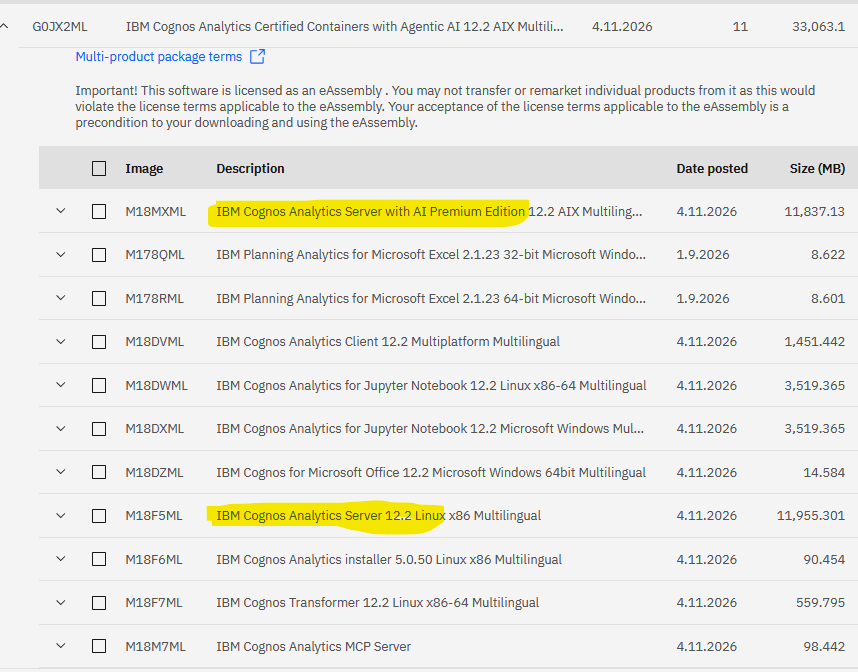
Important: There are once again two different editions: IBM Cognos Analytics Server with Premium Edition 12.2 and the standard IBM Cognos Analytics Server 12.2. The Premium AI Edition can be found under Certified Containers:
IBM Cognos Analytics 12.2.0 introduces a range of interesting functional and technical enhancements.
Dashboard users benefit from additional visualization capabilities, Markdown descriptions, and the new PowerPoint export. Report developers benefit from the modernized Expression Editor and improvements to bursting.
Agentic AI remains a major focus of development. With the Query Agent and the enhanced Report Authoring Agent, IBM continues to expand the possibilities for creating data analyses and reports through natural-language conversations.
For developers and administrators, the extensive REST API enhancements are likely to be particularly important. They provide new opportunities for custom applications, automated administration, and deeper integration of Cognos Analytics into existing IT environments.
The availability of specific AI capabilities depends on the licensing and deployment requirements of the respective environment. These should be verified before production use.
Source: IBM Cognos Analytics 12.2.0 – Release Notes (November 2026)